
Stove Use Monitors (SUMs)
Better understand how different stoves are used and patterns of stove adoption over time. Stove Use Monitoring helps stove developers, researchers, and program evaluators quantify the number of stove use events and the duration of those events. Collect actionable and objective data, allowing key stakeholders to assess and respond to household needs and preferences.

A sample photo of the iButton in-use and attached to a cookstove with thermal tape.
iButtons
iButtons are coin-sized, low-cost, and commercially available temperature loggers that couple with the OneWire Viewer for instrument management. iButton data can then be analyzed in a number of ways, including integrated management and analysis from Geocene Studies.
iButton Types
There are several types of iButtons that can be used on stoves, each with a different operating temperature range and memory. The 8192 data point capacity of the DS1925L and DS1922T iButtons translates to logging temperature readings every ten minutes for 57 days, while the DS1921G iButton can log temperature data every ten minutes for 14 days.
Note: iButtons will fail and become unusable if the stove temperature exceeds the iButton’s operating temperature range. We can help you select the model that will work best for your application and price point.
| iButton Model | Range | Accuracy | Res | Memory | Logging Rate |
| DS1921G | -40°C to +85°C | ± 1°C: -30°C to +70°C ± 1.3°C outside this range |
0.5°C | 2048 | 1 to 255 min |
| DS1925L | -40°C to +85°C | ± 0.5°C: -10°C to +65°C | 0.5°C – 8 bit / 0.0625°C – 11 bit |
8192 – 8 bit / 4096 – 16 bit |
1 sec to 273 hrs |
| DS1922T | 0°C to +125°C | ± 0.5°C: +20°C to +75°C | 0.5°C – 8 bit / 0.0625°C – 11 bit |
8192 – 8 bit / 4096 – 16 bit |
1 sec to 273 hrs |
For more detailed information on specifications of the iButtons see the DS1921G Data Sheet (445 kB) or the DS1922T and DS1925L Data Sheet (531 kB).
Parts and Accessories
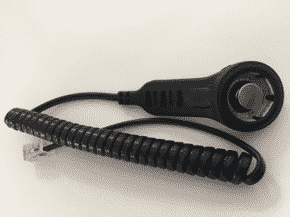
A full SUMS “kit” consists of iButtons, a probe, USB adapter, PICA or OneWire software, insulator, and an instruction manual.
| Probe | Connects the iButton to the USB adapter. | View Image |
| USB Adapter | Connects the probe to a computer for instrument management. | View Image |
| OneWire | Software options for instrument management. | More Details |